> For the complete documentation index, see [llms.txt](https://docs.getconduit.app/llms.txt). Markdown versions of documentation pages are available by appending `.md` to page URLs; this page is available as [Markdown](https://docs.getconduit.app/use-cases/use-case-enhancing-project-management-with-copilot.md).
# Use Case: Enhancing Project Management with Copilot
This use case shows how to use Copilot for basic tasks with project management data and CRM systems.
#### Source dataset overview
The dataset we use has information for agency operations, including project specifics, product details, project statuses, and start dates (launch dates).
Project
Product
Mode of Sale
Partner
Project Status
Actual Start
Vision Enterprises
UXI
On-prem
CloudTech Solutions
In Progress
January
Nexus Innovations
EC
MSP
ConnectX Solutions
Pending Training
March
DataMinds
Wi-Fi
On-prem
TechHub Dynamics
Pending
May
Quantum Networks
Switch, NAC
On-prem
NetworkPro Alliance
Pending Meeting
June
Alpha Synergy
EC, UXI
MSP
Innovate Systems
Lost
August
Synergetic Solutions
NAC
MSP
IntegrateX Partners
In Progress
September
ByteCrafters
Wi-Fi, Switch
On-prem
DataLink Innovations
Pending
October
ProActive Ventures
EC, NAC, Wi-Fi
MSP
CloudConnect Dynamics
Pending Meeting
November
QuantumLeap Tech
EC, Switch
On-prem
NexGen Solutions
Pending Training
December
Elite Connectors
NAC
MSP
SecureNet Integrations
In Progress
February
Fusion Dynamics
UXI, Wi-Fi
On-prem
Connectify Systems
Pending
April
...
...
...
...
...
...
Now, as we connect this dataset to Copilot, let's explore the use case.
#### Find data
Easily find projects based on their current status, launch date, or partner, enabling a quick overview of ongoing initiatives.
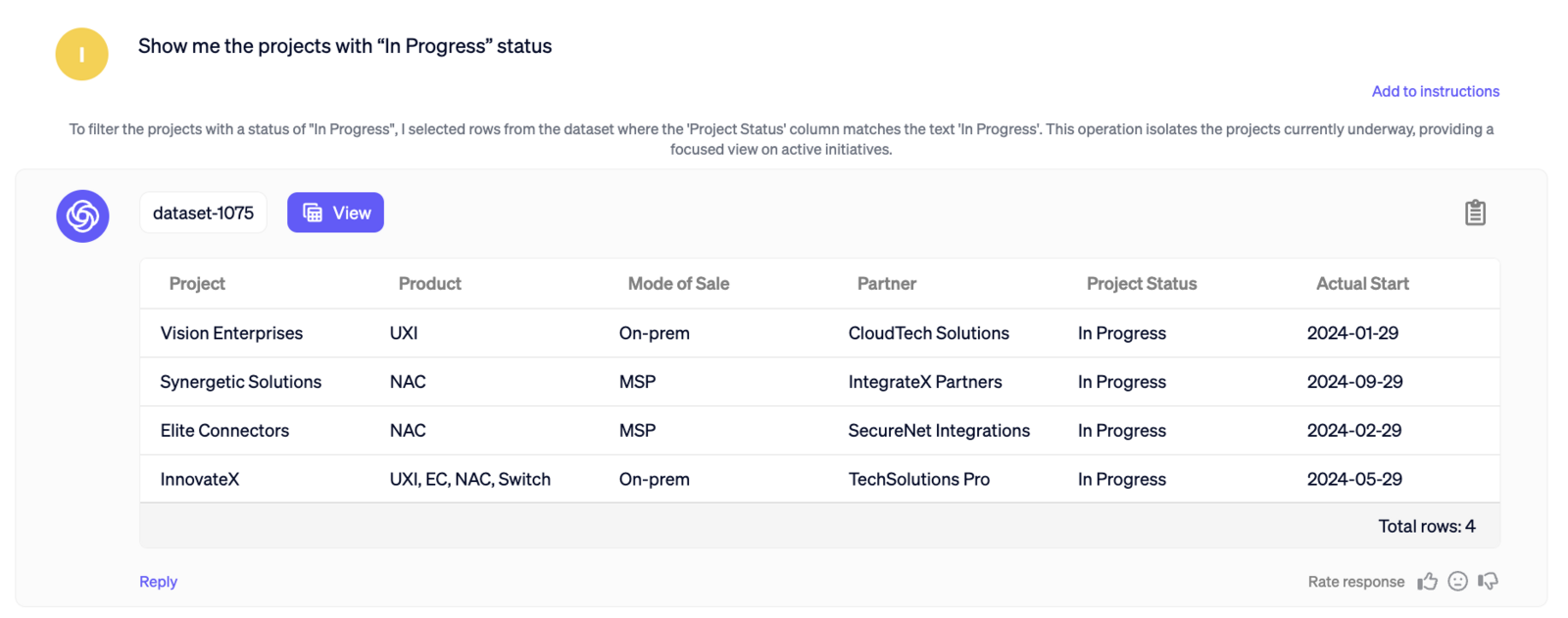
Let’s have the Copilot pull the projects, that are currently in progress: *Show me the projects with “In Progress” status*
Here are our results:\
Now, let’s pull the pending projects with the launch date scheduled for February: *Show me the in proggres projects scheduled for February*
\
The Results screenshot
#### Basic Statistics
Copilot allows examination of how partners contribute to project success. Let’s identify, who was the most performing partner: